
Price Tag FX field guide
How to scan a saved price-tag photo on iPhone
In Price Tag FX, open the Scan tab, tap Photo, and choose an image from the system photo picker. The app normalizes the selected image and sends it through the same accurate OCR, price parsing, and cached conversion pipeline used by Freeze mode. The selected image is processed locally by this code path rather than uploaded for cloud OCR. Photo results do not consume the successful live-scan counter, but revealing a detected price still follows the current scanner access decision, so an exhausted free user can see a locked result until access becomes available or Pro is active.
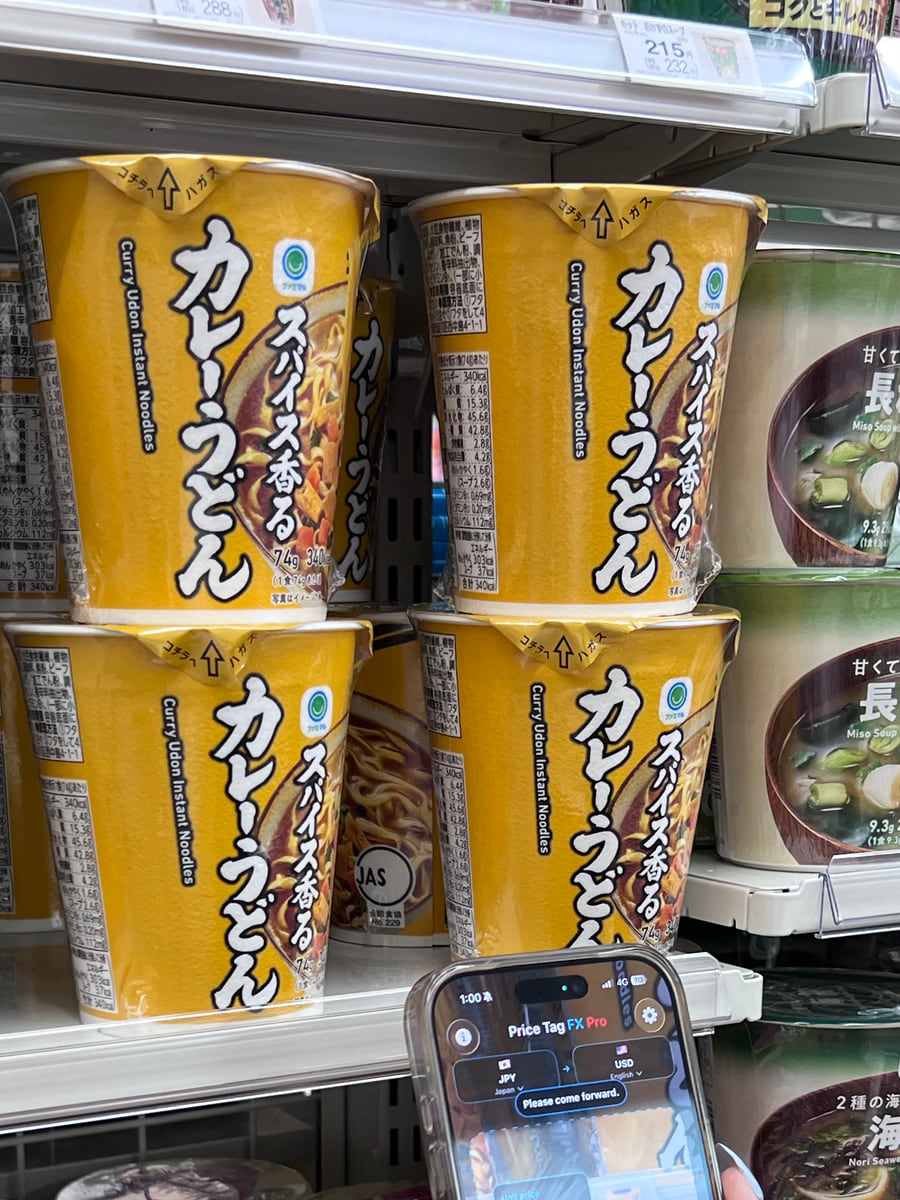
Choose a useful photo, not just any shelf image
The system PhotosPicker lets you select an image without giving the app a general-purpose browser for the whole library. After selection, Price Tag FX loads the chosen image data, decodes it, normalizes orientation and size, and displays it in the scanner. It does not use the live scan viewport crop, so the entire normalized image is available to the still-image recognition pass.
A good source photo contains one main price card at readable resolution. The currency symbol, tax wording, sale label, and membership or quantity condition should remain visible. A wide aisle photo may contain dozens of competing numbers, barcodes, dates, and package weights. Crop before import when possible, or choose the version where the relevant tag is closest, sharpest, and least reflective.
- Open Scan and tap the Photo control.
- Choose an image containing the complete tag and its surrounding retail terms.
- Wait while the app normalizes the image and runs the accurate recognition path.
- Inspect the original amount, likely price role, converted estimate, and any warning.
- Return to live mode when you are ready to scan another physical tag.
- Keep the tag upright when practical.
- Prefer sharp text over a dramatic wide composition.
- Avoid screenshots that have already compressed tiny shelf text beyond legibility.
- Include the currency mark and the words that explain the price.
Source: Apple PhotosUI: PhotosPicker , Apple Vision: Detecting objects in still images
Understand how photo import differs from live and Freeze
Live scanning is throttled so the camera can remain responsive while recognition repeats. Freeze captures the latest camera frame, stops the session, and runs accurate OCR against the visible scan area. Photo import also uses accurate OCR but fits the imported image for display and does not limit recognition to the live aperture. That can help with a deliberate close-up, but it can also introduce more unrelated text when the source image is broad.
All three modes use the selected source market, target currency, output language, local price parser, and cached FX service. Switching to a photo does not bypass an incorrect market selection. A Japanese tag scanned while another market is active can miss Japanese price terms or reject yen evidence in the wrong context. Set the market first or correct it and re-import the photo.
- Set the source market before choosing the image.
- Use live mode for quick aisle scanning.
- Use Freeze for the current camera view when motion is the main problem.
- Use Photo for a saved close-up, a tag sent by a companion, or an image you can crop first.
- Accurate OCR improves the attempt; it does not guarantee correct text.
- Imported images can contain metadata, but the app’s recognition path works from normalized pixels and does not upload the photo for OCR.
- A product-title translation remains optional and installed-pair dependent. Product-title translation requires iOS 26 or later.
Counting and access are two separate rules
The free allowance manager counts stable, successful live-camera results. The scan view intentionally excludes imported-photo viewing from the stable scan-counting path, so choosing photos does not increment the starter or daily successful-scan counter. This does not make photo result presentation an unlimited separate free product.
The overlay still asks the same scanner access decision before revealing a detected price. If starter or daily access is available, the photo result can be displayed without consuming that count. If the allowance is already exhausted, the app can process the image but replace the detected-price presentation with an upgrade message. The automatic paywall trigger is skipped for an imported photo, so the user may need to open Upgrade from Settings. Marketing should say photo import is supported, not promise unlimited free photo scans.
- Check the free-scan badge or Pro status before relying on photo results.
- Import and inspect the result while access is available.
- If the result is locked, wait for daily access or choose an available Pro purchase option.
- Use Settings to open the paywall when photo import does not trigger it automatically.
- Not counted does not mean exempt from access gating.
- Lifetime and active 7- or 30-day passes provide the same paid scanner access.
- Travel passes begin at purchase time and do not auto-renew.
Keep the privacy claim precise
The photo is decoded and processed through Apple Vision on the device. The app does not implement cloud OCR or a cloud product-text translator. A likely product title may use Apple’s on-device Translation framework when the exact pair is installed. The selected photo, recognized OCR text, parsed amount, and product title are not parameters in the app’s defined analytics events. Product-title translation requires iOS 26 or later.
That does not mean the app is network silent. It can contact Frankfurter for exchange rates, Firebase for analytics and crash diagnostics, Apple MapKit when you request a location-based market suggestion, and StoreKit for purchases. A complete privacy explanation should name imported photos explicitly while separating scan content from technical service data.
- No cloud OCR is narrower and more accurate than saying nothing leaves the phone.
- The photo picker limits selection to the image the user chooses.
- Exchange-rate availability remains independent of how the image was acquired.
- There is no supported public inbound deep link for sending another app directly into this import flow.
Source: Apple Vision text recognition
What this workflow cannot confirm
- Photo import requires a decodable still image and can fail on very small, blurry, overexposed, or heavily compressed text.
- The accurate path is still OCR and can misread amounts, separators, currencies, and nearby conditions.
- A broad image can introduce unrelated prices and product text outside the intended shelf card.
- Imported results do not consume scan allowance, but result presentation remains access-gated.
- Apple product-title translation is optional and not a universal package translation service.
- Confirm the current physical or online checkout price because a saved photo can already be outdated.
Troubleshooting
The picker returns an unreadable-photo message
Try the original image rather than a thumbnail, confirm it opens normally in Photos, and crop or rotate it before re-importing.
The wrong price in a wide shelf photo is selected
Crop to one shelf card or take a closer photo with the explanatory text and currency mark still visible.
The app processes the photo but hides the result
The scanner access decision is exhausted. Wait for the next available daily scan or open the Pro options from Settings.
No converted value appears
Correct the source market and target currency, then connect and refresh rates for a snapshot that covers the pair.
Frequently asked questions
Does importing a photo use one of my free scans?
The current counting path excludes imported-photo results, but the app still applies the scanner access decision before revealing the result. It is not an unlimited bypass.
Is the selected photo uploaded?
The app’s OCR path processes the normalized image locally with Apple Vision and does not send it to a cloud OCR service. Other technical services remain part of the app as described in its privacy policy.
Can another app open Price Tag FX directly on the Photo screen?
No supported inbound route exists. The pricetagfx scheme is registered, but there is no public URL parser or photo-import deep-link handler.
Is a saved photo more accurate than Freeze?
Both use the accurate OCR path. The better result depends on focus, resolution, framing, glare, and how much unrelated text is present.
Take the workflow with you
Try Price Tag FX while you shop.
Free to try, with manual conversion and optional non-renewing Pro access.